
WordPress SEO services
We provide WordPress SEO services from a team that also builds, hosts, and supports WordPress websites. Our team can improve your theme, plugins, and server speed, as well as the content on each page. New pages and articles then help grow your rankings over time.
- 140
- WordPress projects completed
- 266
- Sites on our servers
- 45
- Active SEO campaigns
WordPress SEO reviews
“The switch to WordPress was a game changer. Bird made the migration smooth, improved our SEO, and we’ve seen a big increase in leads and sales.”
 4.9/ 598 reviews
 4.9/ 564 reviews
 5.0/ 560 reviews
 5.0/ 565 reviews












How SEO for WordPress sites helps your business
A well-optimised WordPress site can rank for more of the searches your customers make. Plugins such as Yoast are a good start, but your theme, other plugins, and content all affect what Google sees.
- Rankings for the right searches
We give each page on your site its own keyword to target. Your titles and descriptions in Yoast or Rank Math can then be written around that search.
- One fix that improves every page
Your theme controls the headings, markup, and scripts on every page. A fix made in its templates can improve the whole site at once.
2.8xconversions from organic searchJ&I Cleaning case study - More from the content you publish
WordPress makes it easy to publish new pages and articles. A steady content plan helps your site show up for more of the questions your customers ask.
+27%Google clicks year on yearMatter Designs case study
Why choose Bird Marketing for WordPress SEO services
Our SEO specialists look after the keyword plan and content, while our developers and support team take care of the theme, hosting, and updates.



Figures from Nest, 9 November 2026
Many of the WordPress sites we optimise are hosted on our own servers. This lets us adjust caching and server settings directly when a site is slow.
266 sites on our serversFrom Nest, 4 November 2026
Our web team designs and builds WordPress websites from scratch. Any template changes your SEO needs are made by people who know how themes work.
140 WordPress projects completedFrom Nest, 4 November 2026
We plan your site on a mind map, with a keyword for each page. Then we track the work on every page in Nest, so you can see what changed and when.
Our support team keeps WordPress, its plugins, and its theme up to date on sites we host. This makes your SEO improvements less likely to be undone by an update.
WordPress SEO case studies
Here are some of the businesses our WordPress SEO agency has helped grow in organic search.


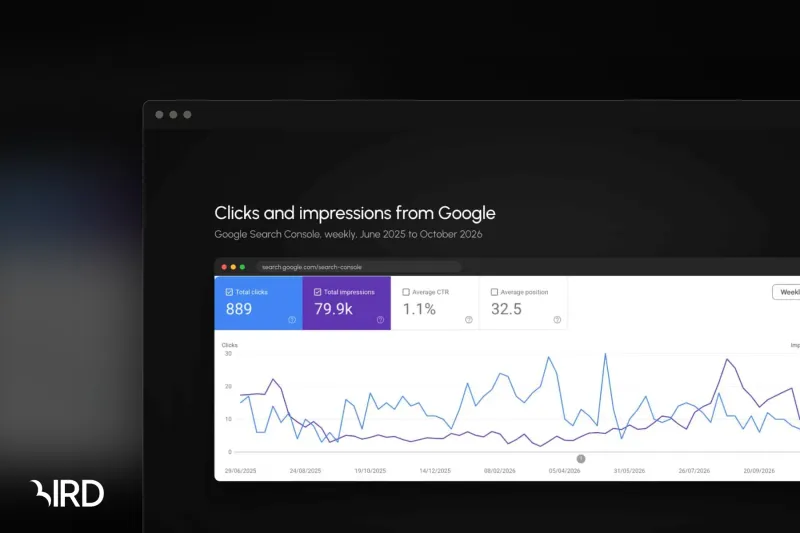
organic sessions, 2024 vs 20227,188 to 12,572

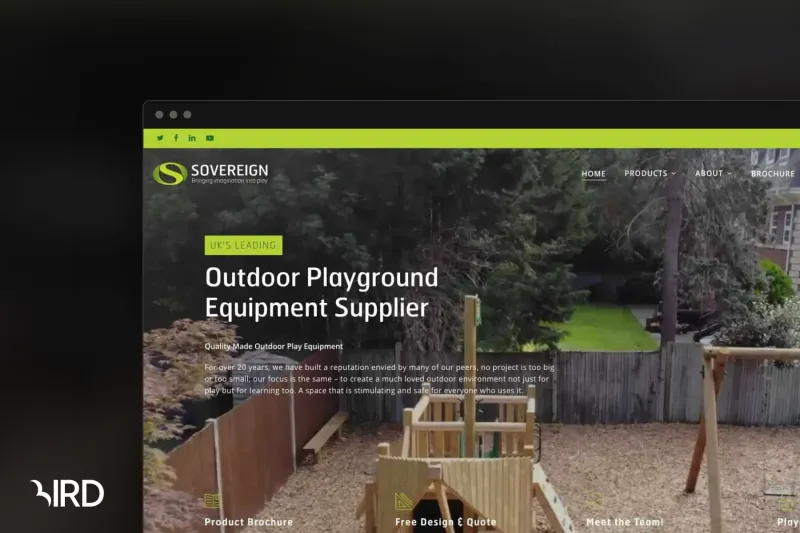
organic sessions in the last 12 months634 to 1,343

keywords in Google's top 10, the month before the move vs a year after326 to 415
What WordPress SEO covers
Our WordPress SEO experts work on five parts of your site, from the content to the server. Each part needs different fixes, so the right people on our team look after each one.
Pick a layer to see the fixes we make there.
- Titles and descriptions page by page
Writing a title and meta description for each page around its own keyword. Our team can add them in your SEO plugin, or we can give your editors a short guide.
- Internal links between related pages
Linking your service pages, articles, and case studies to each other with descriptive anchor text, so Google can see how the site fits together.
- Thin category and tag archives
Noindexing or merging tag and category archives that only hold one or two posts, so they don’t compete with the pages that matter.
New service pages and articles are planned in Nest and drafted for your approval, as on every SEO campaign we run.
- Two plugins writing the same tags
Making sure only one plugin sets each tag. A second SEO plugin, or a page builder with its own SEO settings, can print two titles or two canonical tags.
- Sitemaps that list the wrong pages
Trimming plugin sitemaps that include noindexed pages, attachment pages, or test content, so they only list the URLs that should rank.
- Plugin weight on every page
Removing plugins you don’t need and limiting the rest to the pages that use them, as scripts loaded across the whole site slow everything down.
If you run a shop on WooCommerce, we also look at your catalogue, product templates, and shop plugins.
- Heading structure
Making sure each page has one H1 that matches its keyword, and fixing themes that hand that tag to the logo, the site name, or a slider caption.
- Structured data in the template
Adding organisation, breadcrumb, article, and service markup once in the template, so every page built on it carries the right schema.
- Render-blocking code
Deferring or removing the fonts, sliders, and scripts that slow your pages down as they load. This helps your Core Web Vitals across the whole site.
Our web design team can rebuild any templates that can’t sensibly be fixed.
- Search engine visibility
Checking the setting under Settings > Reading that asks search engines not to index your site, as it sometimes gets left on after a launch.
- Permalink structure
Keeping post and page URLs short and readable, with a redirect from every old URL if the permalink structure ever changes.
- Attachment pages and core updates
Redirecting media attachment pages to their files or parent posts, and updating WordPress itself as a logged job that can be rolled back.
- Caching and response time
Setting up page caching and a current PHP version to cut the time your server takes to respond, which shortens every page load.
- HTTPS and one version of the domain
Redirecting every version of your address, with and without www and over http, in one step to a single secure version.
- Backups before every change
Sites on our servers are backed up regularly, so a plugin or theme change that goes wrong can be rolled back quickly.
Sites on our managed WordPress hosting can be tuned at server level as well as inside WordPress. This helps your Core Web Vitals hold up after the next plugin update.
WordPress SEO in the first few months
The first few months cover a review of your site, keyword research, template fixes, and speed. New pages and articles usually follow from the third month, planned and tracked in Nest.
- Reviewing your installation
- Keyword research and the site mind map
- Template fixes
- Speed improvements
- New pages and articles
- Reviewing your installation Week 1
We look through your plugins, settings, theme, and WordPress version with BirdBot, and crawl the site with Screaming Frog, before we change anything.
- Keyword research and the site mind map Weeks 2 to 4
Researching your competitors and keywords, then mapping each page on the site to its own keyword, title, description, and URL.
- Template fixes Weeks 5 to 8
Titles, headings, schema, and internal links are fixed at template level, so every page built on that template benefits at once.
- Speed improvements Weeks 5 to 8
We tune your caching, images, and server settings, often on hosting we look after ourselves. Then we check the results against Core Web Vitals in Search Console.
- New pages and articles From week 9
New pages and articles are usually planned in Nest from the third month, with links and citations built to the pages most worth ranking.
- Reviewing your installation
- Keyword research and the site mind map
- Template fixes
- Speed improvements
- New pages and articles
Nothing is finished yet.
How we work on WordPress sites
Many WordPress SEO companies send a list of recommendations and leave the changes to your developer. Our WordPress SEO consultant can pass a template problem straight to one of our developers, so the fix is made sooner.
The usual way: SEO recommendations sit in a document until a developer has time.
Our way: Our SEO, web, and hosting teams work together, so whoever spots a template problem can hand it straight to the developer who fixes it.
The usual way: Plugin updates are applied with no easy way to undo them.
Our way: On our servers, each change runs as a logged job in BirdBot that records what was there before, so it can be put back.
The usual way: A new plugin is added for every new problem.
Our way: We try to fix the cause in the theme or settings first, so your site carries fewer plugins and less code on every page.
WooCommerce SEO for WordPress shops
Our WooCommerce SEO services cover the WordPress site behind your shop as well as the products. The scripts each page loads, the cache in front of it and the pages kept out of search all affect how your products and categories rank. This is how we usually set up each type of page.
Pick a column to see that setting for every type of page.
| Page type | |||
|---|---|---|---|
Home page/ | With product blocks | Cached | Indexed |
Buying guide/protecting-oak-worktops/ | Not loaded | Cached | Indexed |
Product category/product-category/worktops/ | Loaded | Cached | Indexed |
Attribute archive/thickness/40mm/ | Loaded | Cached | If it's searched |
Product/product/solid-oak-worktop/ | Loaded | Cached | Indexed |
Basket/basket/ | Loaded | Passed by | Noindex |
Checkout/checkout/ | Loaded | Passed by | Noindex |
My account/my-account/ | Loaded | Passed by | Noindex |
- 1Shop scripts
WooCommerce and its extensions can load scripts and styles on every page of a WordPress site, which slows product pages down. Our developers limit the shop's code to the pages that use it.
- 2Page cache
Full-page caching helps guides, categories and products load quickly. We set it to pass by the basket, checkout and account pages, as these change for every shopper. On our managed WordPress hosting, we can tune the server as well.
- 3In Google's index
Basket, checkout and account pages have nothing to rank for, so they stay out of the index and the sitemap. Attribute archives are only indexed where people search for them.
Our ecommerce web design team builds and redesigns WooCommerce shops with SEO planned in from the start.
George on WordPress plugin clashes
George, one of our SEO executives, on a common WordPress plugin mistake.
One of the first things we check is whether two SEO plugins are running at once, as Google can end up with two different titles for the same page.
WordPress developers and SEO executives
George looks after the SEO on our WordPress campaigns. You’ll also work with our developers, designers, and support team on your theme, plugins, and hosting.






WordPress SEO services FAQs
We’re often asked whether WordPress is good for SEO, and how its plugins and tags work.
Is WordPress good for SEO?
Yes, WordPress is a good base for SEO, because it produces clean, editable pages, works with SEO plugins such as Yoast, and makes regular publishing easy. Your results still depend on the theme, plugins, and hosting, and WordPress SEO services can help with all three.
How does SEO work on WordPress?
WordPress SEO works on the same signals as any other site, which are relevant content, a sound technical setup, and links from other websites. WordPress adds its own controls, with an SEO plugin for titles and sitemaps, the theme for headings and markup, and the hosting for speed.
How do you improve SEO on a WordPress site?
Start with a keyword plan that gives each page one search to target, then set its title and description in your SEO plugin to match. Fix heading and speed problems in the theme, remove plugins you don’t need, and publish useful pages regularly. A WordPress SEO consultant can help put those fixes in the right order.
Are WordPress tags good for SEO?
Tags can help visitors find related posts, but too many of them create thin archive pages. A site with hundreds of tags used once or twice ends up with lots of these pages. We usually keep a short list of tags with several posts each, and noindex or remove the rest.
How do you set up Yoast SEO for WordPress?
Install Yoast, run its first-time configuration, and add your site name, logo, and organisation details. Then choose which post types and archives appear in search, write a title and description for each important page, and submit the XML sitemap in Search Console. A good WordPress SEO agency will also check it doesn’t clash with your theme.
What is the SEO title in WordPress?
The SEO title is the title tag Google usually shows as the blue link in search results. It can be different from the heading people see on the page. In WordPress, you set it in your SEO plugin’s box under the editor, and it should lead with the page’s main keyword.
How can I improve my WooCommerce SEO?
Start by giving each category a keyword and some useful copy, then rewrite the supplier descriptions on your main products. Limit WooCommerce's scripts to shop pages, and set up caching that leaves the basket alone. A WooCommerce SEO agency can help you put those jobs in the right order.
No questions match that search.
Start your WordPress SEO project
- Tell us what you need
Share your website, the services you need and your goals.
- Get your proposal
Market research, the plan and every cost, set out in one document.
- Agree a scope
You’ll have a clear scope before work begins.