
Recruitment web design
Recruitment web design has to work for two audiences at once. Candidates need to search jobs and apply easily, while clients need reasons to trust you with their roles. We design recruitment websites with job search, applications, and client pages built around both.
- 1
- Recruitment web design case studies with results
- +55%
- sessions in the site's second full year, MD Care Group
- +9%
- organic sessions, 2025 vs 2024, MD Care Group
Recruitment web design agency reviews
 4.9/ 598 reviews
 4.9/ 564 reviews
 5.0/ 560 reviews
 5.0/ 565 reviews












Website design for recruitment agencies
Our website design for recruitment agencies usually covers three parts. Each one does a different job for candidates or for clients.
Job search and listings
A job search with filters for sector, location, and type of role, and a page for each job that Google's job search can read.
Applications that are easy to finish
Short application forms with CV upload that work well on a phone, each one tracked back to the page and source it came from.
Pages that win clients
Sector pages, case studies, and a simple way for employers to send you a role.
Job page and candidate data rules
A lot of what goes on a recruitment website is set by employment law, data protection, and Google's job search. Here's how each rule shapes the design, with the official source for each.
Pick a rule to see how it shapes your job pages.
Regulation 27 of the Conduct of Employment Agencies and Employment Businesses Regulations 2003
- What it asks
- Agency job adverts must give the agency's full name and say whether each role is temporary or permanent, with more detail where pay is shown.
- What it means for you
- Your job template has these fields built in, so no listing goes live without them.
- The Conduct of Employment Agencies and Employment Businesses Regulations 2003, regulation 27legislation.gov.uk
- Conduct Regulations 2003: guidance for employment agencies and employment businessesDepartment for Business and Trade
Google's job posting structured data guidelines
- What it asks
- Job markup belongs on each individual job page, and details such as salary and location must match the page.
- What it means for you
- Each job page is marked up from the same data it displays, and closed roles come out of the markup.
- Job posting (JobPosting) structured data for Job SearchGoogle Search Central
Data protection law, with the ICO's guidance on recruitment and selection
- What it asks
- Candidates must be told how their information will be used, and you need a lawful basis for collecting it.
- What it means for you
- Application forms link to your privacy notice and only ask for what you need at that stage.
- Employment practices and data protection: recruitment and selectionInformation Commissioner's Office
WCAG 2.2, from the W3C
- What it asks
- WCAG sets out how to make forms and pages usable for people with disabilities.
- What it means for you
- Application forms work with keyboards and screen readers, which helps more candidates apply.
The Equality Act 2010, with the EHRC's guidance on discriminatory adverts
- What it asks
- Job adverts mustn't discriminate, and gendered job titles or age-related wording can do that by accident.
- What it means for you
- We check templates and page copy for wording that could put off qualified candidates.
- Guidance on discriminatory advertsEquality and Human Rights Commission
Every source is the rule's official page, checked 20 November 2026.
Recruitment web design case studies
They include a careers hub for a clinical provider and a site for a specialist recruitment agency.
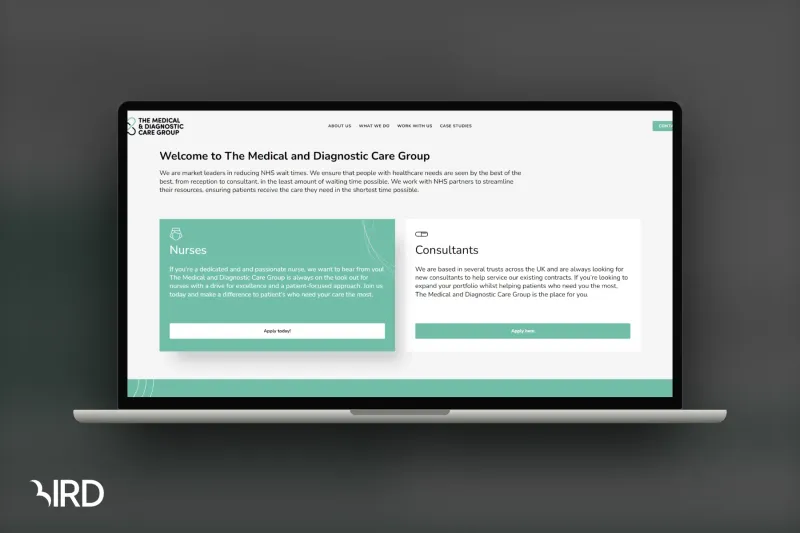
- MD Care Group
A website with a dedicated recruitment section, built to attract nurses and consultants alongside the pages for patients.
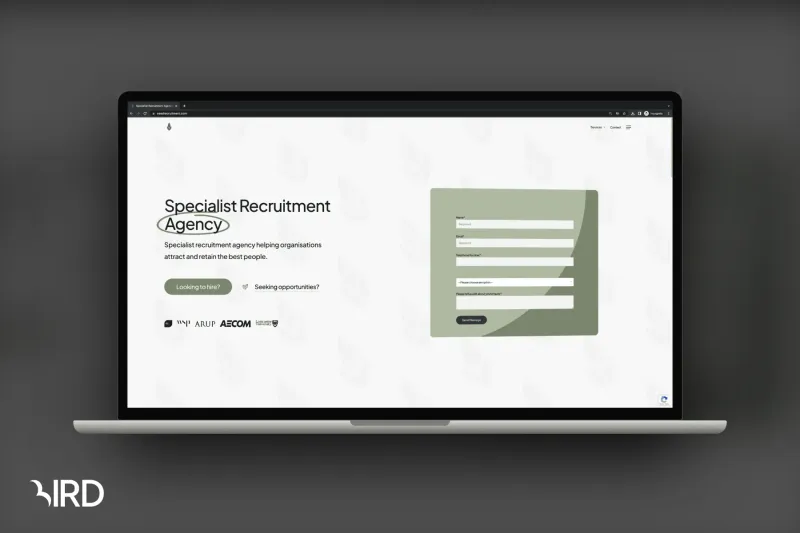
- SEED Recruitment
A redesigned, mobile-friendly website for a specialist recruitment agency, which we have also hosted since 2017.

How much a recruitment website costs
The price depends on the features it needs. A site with a few roles added by hand is a much smaller build than one linked to your recruitment software, so the table below shows what usually makes the difference.
| What affects it | Why it matters | What it changes |
|---|---|---|
| A job feed from your software | Pulling roles from your recruitment CRM saves your team time | Development and testing |
| Candidate accounts | Saved searches, job alerts, and profiles add features | More to build and look after |
| Sectors and locations | Each sector or area you recruit in needs its own page | More templates and content |
| Two audiences | Clients and candidates each need a clear route through the site | More design work up front |
| Moving from an old site | Old job and sector URLs need redirecting | A redirect map before launch |
What we do differently on recruitment websites
We work as a recruitment web design agency with search and applications in mind from the start. These are the places where our approach usually differs.
The usual way: One page listing every job
Our way: A page for each job, sector, and location, so roles can appear in Google's job search and in sector searches
The usual way: Long application forms
Our way: Short forms with CV upload, and more questions only once someone is interested
The usual way: The same pages for clients and candidates
Our way: Clear, separate routes for employers and job seekers from the homepage
The usual way: Jobs added by hand
Our way: Jobs pulled from your recruitment software where it allows, so the site is always current
Insights on recruitment website design
Michael on the design choices that help candidates apply.
We keep animation light around the job search on recruitment sites. Candidates often apply on their phone in a spare minute, so a fast page helps them more than any effect.

What recruitment clients say about our web design
SEED Recruitment has worked with us on its website projects for several years.
The Bird team are always outstanding. We have worked together on our website projects and their recruitment requirements - it's always a pleasure when we get the opportunity to put our heads together. They have hosted our site since 2017 and we've never had an issue. I wouldn't consider working with any other digital agencies because I know how good they are at what they do. Great teams, great company and great results!
 Joseph BellDirector, SEED Recruitment
- 4.9Average rating from 287 reviews on Trustpilot, Google, GoodFirms and Clutch
- 1Recruitment web design case study with public results
Other services for recruitment agencies
A recruitment website brings in more candidates and clients when people can find it and it stays current. These are the services we most often run alongside one.
- SEO
SEO for your sectors and locations helps your new job and sector pages show up in search.
Service page - Web hosting
Secure hosting on our own servers for a site that handles CVs and candidate details.
Service page - Web support
New roles, features, and fixes handled for you, so the site keeps up with your team.
Service page
Recruitment web design FAQs
Answers to common questions about designing websites for recruitment agencies and employers.
What should a recruitment website include?
It should include a job search with useful filters, a page for each job, short application forms with CV upload, and pages that speak to clients. It also needs tracking, so you can see where applications and client enquiries come from.
What makes good website design for recruitment agencies?
Good website design for recruitment agencies gives candidates and clients separate, clear routes through the site. Candidates want to find relevant jobs and apply quickly, while clients want proof you know their sector and an easy way to send you a role.
How do I choose a recruitment web design agency?
Look at recruitment sites they've built, and check how easy it is to search and apply on a phone. A good recruitment web design agency will ask about your recruitment software, job volumes, and sectors early, as those decide much of the build.
Can our website pull jobs from our recruitment software?
Often, yes. Many recruitment CRMs can send live jobs to a website through a feed or an API. That keeps the site up to date without anyone copying roles across, and new jobs can be marked up for Google's job search as they're added.
Can a recruitment website help win new clients?
Yes, if it gives employers a reason to get in touch. Sector pages, placement examples, and reviews help clients judge whether you know their market, and a short form for sending a vacancy makes the next step easy.
No questions match that search.
Start your recruitment web design project
- Tell us what you need
Share your website, the services you need and your goals.
- Get your proposal
Market research, the plan and every cost, set out in one document.
- Agree a scope
You’ll have a clear scope before work begins.